
![How to Drop [or] Alter Table: Sample SQL Queries](https://srinimf.com/wp-content/uploads/2022/07/pexels-photo-10041253.jpeg?w=1024)
Here are two SQL queries to drop or modify a table.
IN THIS PAGE
Don’t Miss
- Selectively you can fetch odd and even records from table. Here’s SQL query helpful.
- SQL data types CHAR Vs VARCHAR the top differences.
- Sub-queries helpful to fetch data from more than one table. Check out how to write complex SQL sub-query
Drop a Table
The widely used SQL query to drop a table syntax is as below.
DROP TABLE [<Schema>.] <Table_Name> [CASCADE CONSTRAINTS];Explanation
- In place of TABLE_NAME, use your table name
- In place of schema, use your schema
- The Cascade constraints drop all referential integrity constraints that refer to primary and unique keys in the dropped table
Example
I am here deleting the HR_OPER table from the database. I used CASCADE constraints, which deletes all the constraints.
DROP TABLE HR_OPER CASCADE CONSTRAINTS;
ALTER a Table
The statement ALTER TABLE you can use to modify a table. Below are the possible ALTER TABLE operations you can apply to a Table.
Basically, the alter table modifies a table.

Example
ALTER TABLE Student ADD StudHall# CHAR (4) ADD FOREIGN KEY (StudHall#) REFERENCES Hall (Hall#);RENAME & TRUNCATE a Table
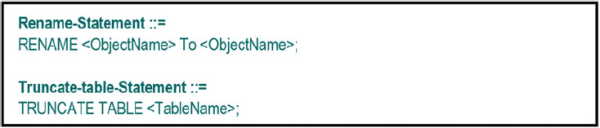
As part of modifying a table, you can rename an existing table. In addition to that, you can truncate all the records in a table. We will see with syntax how you can do those.
The syntax for renaming and truncating
Example
RENAME HR1 TO HR2;
TRUNCATE TABLE HR_OPER;
Related posts







 Srinimf
You must be logged in to post a comment.