

Here are the list of questions asked during an interview with KPMG for Python and SQL developer.
Table of contents

Python and SQL Interview Questions
01. What is OLAP in SQL?
Its full form is Online Analytical Processing
02. Rank Vs Dense Rank?
Rank gives the same rank for duplicate row, and skips next rank in sequence.
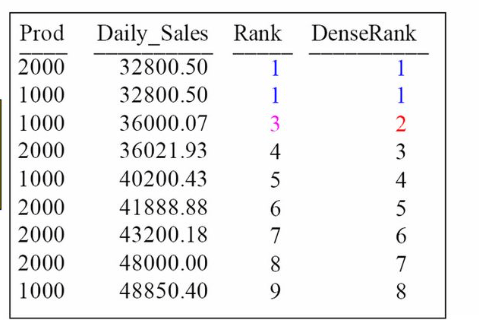
In case of Dense rank, it gives the same rank for duplicates, and the for next row it gives next sequence number. Here is a link on Rank and Dense Rank.
Examples
Here are some sample queries to demonstrate the usage of Rank and Dense Rank in SQL:
- Query to retrieve the rank of employees based on their salary:
SELECT EmployeeName, Salary, RANK() OVER (ORDER BY Salary DESC) AS Rank
FROM Employees;
- Query to retrieve the dense rank of employees based on their salary:
SELECT EmployeeName, Salary, DENSE_RANK() OVER (ORDER BY Salary DESC) AS DenseRank
FROM Employees;
- Query to retrieve the rank and dense rank of employees within each department:
SELECT EmployeeName, Salary, Department,
       RANK() OVER (PARTITION BY Department ORDER BY Salary DESC) AS Rank,
       DENSE_RANK() OVER (PARTITION BY Department ORDER BY Salary DESC) AS DenseRank
FROM Employees;
These queries will help you understand and implement Rank and Dense Rank in SQL.
03. How to replace a portion of String in Oracle?
Input=”1234567″
Output=”@@@@567″
Example Query
SELECT CONCAT('@@@@', SUBSTR('1234567', 4)) AS Output FROM dual;04. UNION vs UNION ALL ?
UNION will return all the rows excluding duplicates. The UNION ALL returns all the rows including duplicates.
05. DELETE VS. TRUNCATE Vs. DROP?
When it comes to manipulating data in a database, there are three commonly used operations: DELETE, TRUNCATE, and DROP. Let’s take a closer look at each of these operations and understand their differences:
DELETE: The DELETE statement is used to remove specific records or rows from a table. It is a DML (Data Manipulation Language) operation that removes only the selected rows, based on the specified conditions or criteria. The DELETE operation can be rolled back (if used within a transaction) and the table’s structure and associated objects remain intact.
Syntax:
DELETE FROM table_name WHERE condition;
Example:
DELETE FROM Employees WHERE Salary < 50000;
TRUNCATE: The TRUNCATE statement is used to remove all the records or rows from a table. It is a DDL (Data Definition Language) operation that quickly removes all the data in the table, unlike the DELETE statement, which removes rows one by one. TRUNCATE is not logged in the transaction log, which makes it faster and cannot be rolled back. The table structure and associated objects, such as indexes and constraints, remain intact after truncating.
Syntax:
TRUNCATE TABLE table_name;
Example:
TRUNCATE TABLE Employees;DROP: The DROP statement is used to remove an entire table, including its structure and associated objects. It is a DDL operation that completely removes the table and all its data, as well as any associated indexes, constraints, triggers, or other objects. The DROP operation cannot be rolled back, and once executed, the table ceases to exist in the database.
Syntax:
DROP TABLE table_name;
Example:
DROP TABLE Employees;It’s important to note that while DELETE and TRUNCATE can be used on specific tables, DROP is used to remove entire tables. Choose the appropriate operation based on your specific requirements and the impact you want to have on your database.
06. What is UPDATE query in SQL?
The UPDATE query is a SQL statement used to modify the existing data in a table. It allows you to update one or more columns of one or multiple rows in a table based on specified conditions. The syntax for the UPDATE query is as follows:
UPDATE table_name
SET column1 = value1, column2 = value2, ...
WHERE condition;
In the above syntax:
table_nameis the name of the table you want to update.column1,column2, … are the names of the columns you want to update.value1,value2, … are the new values you want to assign to the specified columns.WHEREis an optional clause that specifies the conditions that must be met for the update to occur. If you omit the WHERE clause, all rows in the table will be updated.
Here’s an example to illustrate the usage of the UPDATE query:
UPDATE Employees
SET Salary = 55000
WHERE Department = 'Finance';
In the example above, the UPDATE query will update the Salary column of all employees in the ‘Finance’ department to a new value of 55000.
Remember to be cautious when using the UPDATE query as it can modify a large number of rows if the conditions are not properly specified, leading to unintended changes in the data.
07. How to read CSV file with delimiter in Pandas?
To read a CSV file with a specific delimiter in Pandas, you can use the pd.read_csv() function and specify the delimiter parameter. Here’s the syntax:
import pandas as pd

df = pd.read_csv('file.csv', delimiter='your_delimiter')
Replace 'file.csv' with the path to your CSV file, and 'your_delimiter' with the actual delimiter used in the file, such as , for a comma delimiter or ; for a semicolon delimiter.
For example, if your CSV file has a tab delimiter, you can use the following code:
import pandas as pd

df = pd.read_csv('file.csv', delimiter='\t')
Make sure to import the pandas library first, and assign the returned DataFrame to a variable (df) to work with the data further.
By specifying the delimiter correctly, Pandas will read the CSV file using the specified delimiter and create a DataFrame with the data from the file.
08. Python data structures?
Python provides several built-in data structures that are commonly used for storing and manipulating data. Here are some of the most commonly used Python data structures:
1. Lists: Lists are ordered, mutable (modifiable), and can contain elements of different data types. They are denoted by square brackets [ ] and elements are separated by commas. Lists allow duplicate values and can be indexed and sliced.
Example:
fruits = ['apple', 'banana', 'orange']
2. Tuples: Tuples are ordered, immutable (unchangeable), and can contain elements of different data types. They are denoted by parentheses ( ) and elements are separated by commas. Tuples allow duplicate values and can be indexed and sliced.
Example:
person = ('John', 25, 'New York')
3. Sets: Sets are unordered, mutable (modifiable), and contain unique elements. They are denoted by curly braces { } or by using the set() constructor. Sets do not allow duplicate values and do not support indexing or slicing.
Example:
fruits = {'apple', 'banana', 'orange'}
4. Dictionaries: Dictionaries are unordered, mutable (modifiable), and contain key-value pairs. They are denoted by curly braces { } and each key-value pair is separated by a colon :. Keys must be unique and immutable, while values can be of any data type. Dictionaries allow fast retrieval of values by using keys.
Example:
person = {'name': 'John', 'age': 25, 'city': 'New York'}
5. Strings: Strings are ordered and immutable (unchangeable) sequences of characters. They are denoted by single quotes '' or double quotes "". Strings can be indexed and sliced, and Python provides many built-in methods for string manipulation.
Example:
message = "Hello, World!"
These are the basic data structures in Python, and each one has its own characteristics and use cases. Depending on your needs, you can choose the appropriate data structure to store and manipulate your data efficiently.
09. How to create a Dictionary from two lists of Keys and Values?
To create a dictionary from two lists of keys and values in Python, you can use the zip() function and the dict() constructor. Here’s an example:
keys = ['name', 'age', 'city']
values = ['John', 25, 'New York']

dictionary = dict(zip(keys, values))
In the above code, zip(keys, values) combines the corresponding elements from the keys and values lists into pairs. The dict() constructor then converts these pairs into a dictionary, where the elements from the keys list become the keys and the elements from the values list become the values.
After executing the code, the dictionary variable will hold the following dictionary:
{'name': 'John', 'age': 25, 'city': 'New York'}
You can use different lists for keys and values, as long as both lists have the same length.
10. What are SQL window functions?
SQL window functions are a powerful feature introduced in SQL:2003 that allows performing calculations across a set of rows that are related to the current row. These functions operate on a “window” of rows, which is defined by a specific window frame or partition.
The key characteristics of SQL window functions are:
- Partitioning: The data is divided into partitions or groups based on specified criteria. Each partition is treated independently, and calculations are performed within the partition.
- Ordering: The data within each partition is ordered based on a specified column or expression. The ordering determines the sequence of rows within the window.
- Frame Specification: A window frame defines the subset of rows within the partition that the window function operates on. It can be defined using different techniques, such as specifying a number of preceding or following rows relative to the current row or using a range of values.
SQL window functions can be used to perform various calculations and aggregations, such as:
- SUM, AVG, MIN, MAX: Calculate the sum, average, minimum, or maximum value within the window.
- COUNT: Count the number of rows within the window.
- ROW_NUMBER: Assign a unique sequential number to each row within the window.
- RANK, DENSE_RANK: Assign a ranking value based on specified criteria, such as the order of values within the window.
- LEAD, LAG: Access the values of rows that come after or before the current row within the window.
- FIRST_VALUE, LAST_VALUE: Access the first or last value in the ordering within the window.
Window functions enhance the capabilities of SQL by allowing complex calculations to be performed efficiently and easily. They eliminate the need for self-joins or subqueries in many cases, making queries more concise and efficient.
It’s worth noting that not all database systems support window functions, and the syntax may vary slightly between different database vendors. However, the general concept and functionality remain the same.
Reference Books and Courses
The Complete SQL Bootcamp – Zero to Hero
Oracle SQL: The Best SQL Book in the Galaxy
Conclusion
The content provided above offers a comprehensive list of interview questions for a Python and SQL developer position at KPMG. It covers various topics such as OLAP, ranking functions, string manipulation, data manipulation operations (DELETE, TRUNCATE, and DROP), the UPDATE query in SQL, reading CSV files with specific delimiters in Pandas, Python data structures, creating a dictionary from two lists, and SQL window functions.
In addition to the interview questions, the content also includes a reference to a recommended course, “The Complete SQL Bootcamp – Zero to Hero,” available on Udemy.
Overall, this content provides valuable information and resources for anyone preparing for an interview at KPMG or seeking to enhance their Python and SQL development skills.







 Srinimf
You must be logged in to post a comment.