

PySpark SQL can find table columns that contain specific keywords. I have three tables: EMP1, DEPT1, and ALLOWANCE1, each with columns that include the word “id.” My goal is to retrieve each table along with its column names.
Databricks: PySpark SQL Create Table EMP1
CREATE TABLE EMP1 (
        EMPNAME STRING,
        EMP_ID INT,
        SALARY FLOAT,
        PF_ID STRING
    )
Databricks: PySpark SQL Create Table DEPT1
CREATE TABLE DEPT1 (
        DEPT_ID INT,
        DEPT_NAME STRING
    )
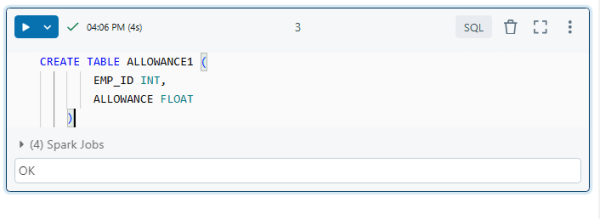
Databricks: PySpark SQL Create Table ALLOWANCE1
CREATE TABLE ALLOWANCE1 (
        EMP_ID INT,
        ALLOWANCE FLOAT
    )
Schema That Shows All the Tables
The “default” schema has all three tables. You can see it here.

Python logic that retrieves all the tables and columns
%python
schema_name = "default"
search_Word = ["id"]
final_list = []

# Get all tables in the schema
list_tables = spark.sql(f"SHOW TABLES IN {schema_name}")

for table in list_tables.collect():
    table_name = table.tableName  # Extract the table name
    if "bkp" in table_name.lower() or "backup" in table_name.lower():
        continue  # Skip backup tables
    else:
        # Get column details for the table
        columns = spark.sql(f"DESCRIBE {schema_name}.{table_name}").collect()

        # Use list comprehension to filter matching columns
        matching_columns = [
            col.col_name for col in columns
            if any(word in col.col_name.lower() for word in search_Word)
        ]

        # Append table name and matching columns to the final list
        if matching_columns:
            final_list.append((table_name, matching_columns))

# Create a DataFrame from the final list
df = spark.createDataFrame(final_list, ["Table_name", "Column_names"])

# Display the DataFrame
display(df)
This code finds tables and columns in a schema that contain the search term “id” and returns a list of these tables and their matching columns in a DataFrame format.
Step-by-Step Explanation:
- Schema and Search Word Definition:
schema_name = "default" search_Word = ["id"] final_list = []schema_name = "default": Specifies the schema where you are looking for tables (e.g.,defaultschema in Spark).search_Word = ["id"]: A list of words you want to search for in column names. In this case, it will search for any column name containing “id”.final_list = []: Initializes an empty list to store the results.
- Fetch Tables in the Schema:
list_tables = spark.sql(f"SHOW TABLES IN {schema_name}")- This Spark SQL command retrieves all the tables in the specified schema (in this case,
"default").
- This Spark SQL command retrieves all the tables in the specified schema (in this case,
- Iterate Through Each Table:
for table in list_tables.collect(): table_name = table.tableName # Extract the table name- The
forloop iterates through the list of tables in the schema. Thetable.tableNameextracts the name of each table.
- The
- Skip Backup Tables:
if "bkp" in table_name.lower() or "backup" in table_name.lower(): continue # Skip backup tables- If the table name contains the “bkp” or “backup” (case insensitive), it skips that table using the
continuestatement.
- If the table name contains the “bkp” or “backup” (case insensitive), it skips that table using the
- Get Column Details for the Table:
columns = spark.sql(f"DESCRIBE {schema_name}.{table_name}").collect()- The
DESCRIBEcommand gets metadata for each table, including column names, types, and details. .collect()converts the result into a list ofRowobjects, which is easier to work with in Python.
- The
- Filter Columns Based on
search_Word:matching_columns = [ col.col_name for col in columns if any(word in col.col_name.lower() for word in search_Word) ]- This list comprehension filters the column names. It checks if any word in
search_Wordis present in the column name (col.col_name). - The
lower()the function ensures case-insensitive matching, so “ID”, “id”, or “Id” will all match.
- This list comprehension filters the column names. It checks if any word in
- Store Results in
final_list:if matching_columns: final_list.append((table_name, matching_columns))- If there are any matching columns (i.e., if
matching_columnsis not empty), it appends a tuple of(table_name, matching_columns)tofinal_list.
- If there are any matching columns (i.e., if
- Create DataFrame:
df = spark.createDataFrame(final_list, ["Table_name", "Column_names"])- After processing all tables, a DataFrame is created from
final_list. The DataFrame will have two columns:Table_name(the name of the table) andColumn_names(a list of matching column names).
- After processing all tables, a DataFrame is created from
- Display DataFrame:
display(df)- This will display the DataFrame in Databricks as a table, showing the
Table_nameandColumn_names.
- This will display the DataFrame in Databricks as a table, showing the
Output
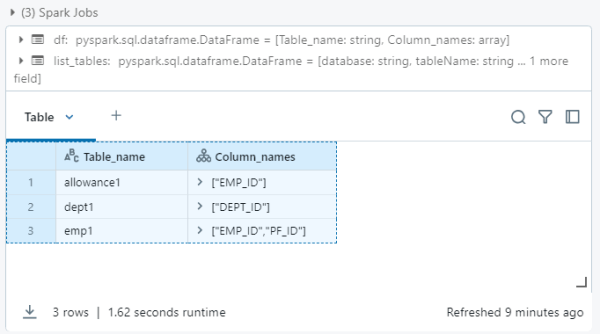
Table_name	Column_names
allowance1	["EMP_ID"]
dept1	        ["DEPT_ID"]
emp1	        ["EMP_ID","PF_ID"]






 Srinimf
You must be logged in to post a comment.