

Use pip or apt-get to install BeautifulSoup in Python. Fix errors during installation by following commands provided here.
Install the BeautufulSoup parser in Linux python easily by giving the below commands.
Method:1
$ apt-get install python3-bs4 (for Python 3)Method:2
$ pip install beautifulsoup4Note: If you don’t have easy_install or pip installed
$ python setup.py install
How to Fix Syntax Error After Installation
Here it is about setup.py.
$ python3 setup.py install
or,
convert Python2 code to Python3 code
$ 2to3-3.2  -w  bs4
How to install lxml
BeautifulSoup is a standard parser in Python3 for HTML tags. You can also download additional parser.
$ apt-get install python-lxml
or
$ easy_install lxml
or
$ pip install lxml
How to Install html5lib
$ apt-get install python-html5lib
or
$ easy_install html5lib
or
$ pip install html5lib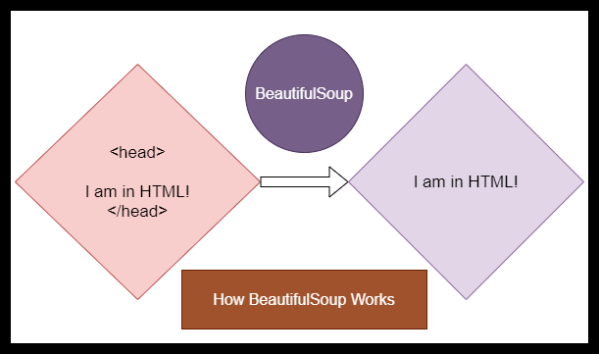
How do I Remove HTML Tags in Web data
You have supplied two arguments for BeautifulSoup. One is fp and the other one is html.parser. Here, the parsing method is html.parser. You can also use xml.parser.
Python Code
from bs4 import BeautifulSoup
with open("index.html") as fp:
soup = BeautifulSoup(fp, 'html.parser')
soup = BeautifulSoup("<html>a web page</html>", 'html.parser')
print(BeautifulSoup("
<html>
<head>
</head>
<body>
<p>
Here's a paragraph of text!
</p>
<p>
Here's a second paragraph of text!
a</body>
</html>", "html.parser"))
The Output
Here's a paragraph of text!
Here's a second paragraph of text!
You May Also Like: BeautifulSoup Tutorial
Latest from the Blog

AI Agents in Data Engineering: Everything You Need to Know
AI agents are revolutionizing data engineering by automating tasks such as monitoring pipelines, generating SQL queries, and ensuring data quality. They enhance productivity, speed up troubleshooting, and improve data accessibility for users. While offering significant advantages, AI agents also face challenges in security, accuracy, and integration with existing systems.
The End-to-End AI Stack – A Real Guide for Developers to Code, Create, and Execute
Artificial Intelligence tools are on the rise, from writing assistants to coding helpers and automation platforms. However, many professionals struggle to compare these tools effectively. This is where the AI Stack becomes important. Modern AI tools like ChatGPT, NotebookLM, and Antigravity serve different purposes, and understanding their roles helps in: Layer 1: Conversational AI (Thinking…

10 Workplace Communication Speaking Exercises to Improve Fluency at Work
Strong workplace communication is one of the most valuable professional skills today.Whether you’re giving project updates, speaking to clients, or collaborating with teams — the ability to speak clearly and confidently can set you apart. However, many professionals struggle with: One of the best ways to improve is through chunking and pausing. Chunking helps you:✔…
12 Top Python Coding Interview Questions
Useful for your next interview.







 Srinimf
You must be logged in to post a comment.